
Quick answers
How do I stop scrolling in bed?
Set a wind-down time and act before it arrives: lock the apps that keep you up, charge your phone away from the bed, and have a short routine ready to fill the gap. Deciding in advance works better than trying to stop mid-scroll.
Why can't I put my phone down at night?
Feeds have no last page, so there's no natural place to stop. You're also tired, and stopping takes effort. For many people, bed is the first quiet moment of the day, so the phone fills it.
Is there an app that stops me scrolling at bedtime?
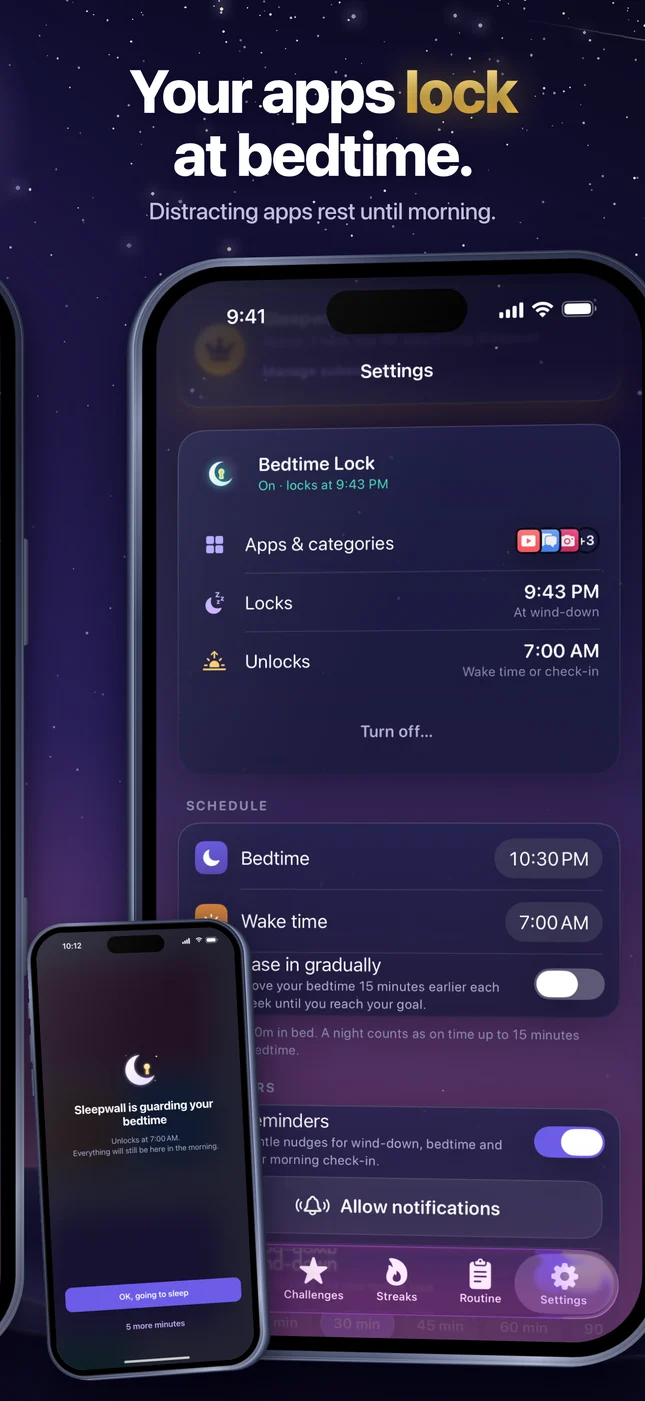
Sleepwall is an iPhone app for this. With Bedtime Lock, the apps you pick lock at wind-down or bedtime and stay locked until your wake time or your morning check-in. Bedtime Lock is free for one night, one time, and Sleepwall Pro keeps it on every night.
Why scrolling in bed is so hard to stop
Four things line up at the same hour.
- No end point. A book has chapters and a show has credits. A feed keeps going.
- You're tired. Stopping is a decision, and decisions are harder late at night.
- It's your first quiet time. If the day was full, the scroll feels like the only part that's yours.
- The phone is already there. It's your alarm, so it comes to bed with you.
None of this is a character flaw. It's a setup problem, and a setup can be changed. If you stay up on purpose to get time to yourself, read about revenge bedtime procrastination.
What it costs you
The cost is mostly time: the half hour that becomes ninety minutes. The CDC says adults aged 18 to 60 need 7 or more hours of sleep a night.
Light matters too. The NHS says the blue light from screens can make it harder to fall asleep.
A six-step plan
1. Set a bedtime and a wind-down time
Start from the time you have to wake up and count back the sleep you need. That's your bedtime. Your wind-down starts 30 to 60 minutes before it. The wind-down time is the one that matters, because it's when the phone goes down.
2. Decide early, not at midnight
Set your limits in the afternoon, when you're rested. Your phone's built-in screen time settings can put app limits on a schedule, and a bedtime app blocker can lock the apps you choose. Pick only the apps that keep you up: usually social media, video and games.
3. Move the phone
Charge it across the room, or outside the bedroom if you can. If it's your alarm, turn the volume up and leave it out of reach, or buy a basic alarm clock. Distance does what willpower can't.
4. Put something in the gap
Taking the phone away leaves an empty half hour. Fill it on purpose. The NHLBI suggests using the hour before bed for quiet time and avoiding bright artificial light, such as from a TV or computer screen. A simple wind-down:
- Dim the lights and get ready for bed.
- Write tomorrow's list, so it's out of your head.
- Read a few pages of a paper book.
- Breathe slowly for a few minutes, or play a steady sound such as rain.
5. Allow one extension, set in advance
"Just five more minutes" is how an hour disappears. Give yourself one short extension a night and no second one. A rule you set earlier is easier to keep than a new argument with yourself.
6. Count the on-time nights
Mark each night you were in bed on time. A streak gives you a reason to stop tonight. If you miss a night, start again the next one. One late night isn't a failed plan.
If the phone is already in your hand
For tonight, with no setup:
Switch to audio only, such as a steady sound or something calm to listen to, and put the phone face down.
Set a timer so the sound turns itself off.
Put the phone on the floor or across the room.
If you're still awake after about 20 minutes, the NHS suggests getting up, sitting somewhere comfortable and doing something relaxing, then going back to bed when you feel sleepy. Leave the phone where it is.
When this is not the right tool
A plan like this, or an app blocker, helps with a habit. It isn't treatment for a sleep problem. If you put the phone away and still lie awake most nights, that's a different issue. The CDC says to talk to your healthcare provider if you regularly have problems sleeping.
It's also the wrong tool if you need your phone at night for work, for someone you care for or for safety. Keep calls and messages on, and lock only the apps that keep you up.
Frequently asked questions
How long before bed should I stop using my phone?
Public health advice runs from 30 minutes to an hour. The CDC says to turn off electronic devices at least 30 minutes before bedtime. The NHS suggests an hour without phones, tablets or computers. Start with 30 minutes and build up.
Does a night mode or a dimmer screen solve it?
It changes the light, not the feed. A warmer, dimmer screen still has no last page. If lost time is the problem, the fix is to stop the scroll, not to tint it.
Should I keep my phone out of the bedroom?
If you can, yes. It's the simplest fix and it costs nothing. If you can't, charge it out of arm's reach and lock the apps that keep you up.
Does Sleepwall lock my whole phone?
No. It locks the apps you pick. They lock at wind-down or bedtime and stay locked until your wake time or your morning check-in. Once a night you can take 5 more minutes.
Is Sleepwall free?
Sleepwall is free to download. Bedtime Lock is free for one night, one time. The guided wind-down, sleep sounds, one-tap check-ins, streaks, levels, quests, badges and the weekly recap are free. Sleepwall Pro adds Bedtime Lock every night, insights, smart nudges, themes and export.
How Sleepwall does it
Sleepwall is an iPhone app from GW Labs for getting to bed on time. It's a habit tool, not a sleep treatment.
- Bedtime Lock: pick the apps that keep you scrolling. They lock at wind-down or bedtime and stay locked until your wake time or your morning check-in.
- "5 more minutes" once a night, then lights out.
- Built on Apple's Screen Time, so your choice of apps stays private on your iPhone.
- A guided wind-down: your routine one step at a time, with timers and calm breathing.
- Sleep sounds generated on your iPhone: brown noise, pink noise, soft rain and gentle waves, with a sleep timer that fades out.
- A one-tap morning check-in, and a streak for on-time nights. A 15-minute grace window and streak freezes forgive an off night.
- Turn on Bedtime Lock in one tap from Control Center, the Shortcuts app or Siri.
- Private: no account and no ads. Your sleep logs stay on your iPhone.
- Free: Bedtime Lock for one night, one time, plus the guided wind-down, sleep sounds, check-ins, streaks, levels, quests and badges. Sleepwall Pro adds Bedtime Lock every night, insights over 7, 14, 30 and 90 days, smart nudges, themes and PDF or CSV export. Pro is weekly, monthly, yearly or a one-time lifetime purchase.